
Quick Start — 2D periodic Gaussian forest
This guide runs the default test case shipped in bin/: a 100 m × 100 m periodic domain with 1 000 random Gaussian bathymetric bumps and a random initial free surface. No open boundaries, no forcing — pure free-surface shallow-water dynamics on an unstructured periodic mesh.
┌────────────────────────────────┐ ↕ │ ~ ~ ~ ~ ~ ~ ~ ~ ~ ~ │ ↕ │ ▲ ▲ ▲ ▲ ▲ ▲ ▲ ▲ ▲ │ │ _/\_/\_/ \_/ \_/\_/\_/ \_/ \_/ │ └────────────────────────────────┘ periodic periodicExpected runtime: ~15 seconds on a laptop (sequential, ~93 000 cells, 2 min simulation).
Prerequisites
Section titled “Prerequisites”- GNU Fortran (
gfortran ≥ 9) or Intel Fortran (ifort) - GNU Make
- Python 3 + gmsh for mesh generation
- ParaView for visualization
pip install gmsh1. Clone and compile
Section titled “1. Clone and compile”git clone --recursive https://github.com/TolosaProject/Tolosa-sw.gitcd Tolosa-swmake C=gnu PERIO=yesThe --recursive flag is required to clone the Tolosa-lib submodule. PERIO=yes enables the periodic boundary condition support — required for this default case. Confirm compilation completes without errors before continuing.
2. Generate the mesh
Section titled “2. Generate the mesh”The periodic box mesh is not shipped in the repository (it is regenerated from bin/box.py). Run the provided script once:
bash bin/init.shThis generates bin/box.msh (~93 000 triangles at 0.5 m resolution) and prints:
Generating box.msh ...Done — run with: make C=gnu PERIO=yes mrun3. Run
Section titled “3. Run”make C=gnu PERIO=yes mrunStartup — mesh and boundary conditions
****************************************************************************************************    _____    _   |_   _|__| |___ ___ __ _   ____ __ __     | |/ _ \ / _ (_-</ _` | (_-< V  V /     |_|\___/_\___/__/\__,_| /__/\_/\_/
****************************************************************************************************====================================================================================================* Mesh Loading: box.msh========================================================================================================================================================================================================* Mesh Loading is OK, with 92586 cells====================================================================================================* - bc tag  1: periodic====================================================================================================* Initialize bathy from 'bin/m_user_data.f90'========================================================================================================================================================================================================* Initialize h/u/v from 'bin/m_user_data.f90'========================================================================================================================================================================================================* SW scheme is switched to dissipative one for h < 10.00 cm====================================================================================================
Time loop — one Tecplot + VTK snapshot per second:
nt = 7 t = 1.35383E-01 / 1.20000E+02 ( 0.1 % ) , dt = 1.932828E-02nt = 13 t = 2.51298E-01 / 1.20000E+02 ( 0.2 % ) , dt = 1.931221E-02nt = 19 t = 3.67077E-01 / 1.20000E+02 ( 0.3 % ) , dt = 1.928310E-02...nt = 6259 t = 1.20000E+02 / 1.20000E+02 ( 100.0 % ) , dt = 1.121407E-02Profiling table — printed at the end of every run:
**************************************************************************************************** Timer Labels Mean Time (s) Deviation Time (s) Min (s) Max (s) Calls**************************************************************************************************** Time of simulation 1.5650E+01 (100%) 0.0000E+00 ( 0%) 1.565E+01 1.565E+01 1.000E+00 Advance Time 3.4170E-01 ( 2%) 3.2462E-02 ( 0%) 5.100E-05 1.940E-04 6.259E+03 FV Edge Loop 1.1913E+01 ( 76%) 1.5003E+00 ( 10%) 1.630E-03 8.398E-03 6.259E+03 FV Cell Loop 1.3825E+00 ( 9%) 8.2170E-02 ( 1%) 2.060E-04 6.300E-04 6.259E+03 Boundary Condition 7.7680E-03 ( 0%) 3.7019E-03 ( 0%) 0.000E+00 1.500E-05 6.259E+03 Tecplot Output 1.8201E-01 ( 1%) 2.4167E-02 ( 0%) 1.120E-03 2.280E-03 1.200E+02 VTK Output 1.2512E-01 ( 1%) 1.8806E-02 ( 0%) 7.910E-04 1.519E-03 1.200E+02 Restart (old) Output 5.7700E-03 ( 0%) 0.0000E+00 ( 0%) 5.770E-03 5.770E-03 1.000E+00 Restart (bin) Output 1.0580E-03 ( 0%) 0.0000E+00 ( 0%) 1.058E-03 1.058E-03 1.000E+00 Pre-Treatment 7.7530E-03 ( 0%) 3.5023E-03 ( 0%) 0.000E+00 1.800E-05 6.259E+03 Post-Treatment 1.4169E+00 ( 9%) 1.0327E-01 ( 1%) 2.140E-04 6.330E-04 6.259E+03**************************************************************************************************** Perf = 2.701E-02 microsec / dx / dt / proc****************************************************************************************************Reading the profiling table. The FV Edge Loop dominates at 76% — normal for an unstructured mesh with no forcing or open BCs. Post-Treatment (energy, volume) accounts for 9%. The ~6 259 time steps over 120 s give an average Δt ≈ 19 ms, set by the CFL = 0.5 on the 0.5 m cells.
VTK files are written to bin/res/vtk/, Tecplot to bin/res/tecplot/, energy/volume diagnostics to bin/res/.
4. Plot gauge time series
Section titled “4. Plot gauge time series”bash bin/finish.shThis reads bin/res/gauge/G_*.csv and saves bin/gauges.png — one SSH curve per gauge. The three gauges (defined in bin/savefield.yaml) cover different locations in the 100 m × 100 m domain:
| Gauge | x (m) | y (m) |
|---|---|---|
G_center | 50 | 50 |
G_NW | 20 | 80 |
G_SE | 80 | 20 |
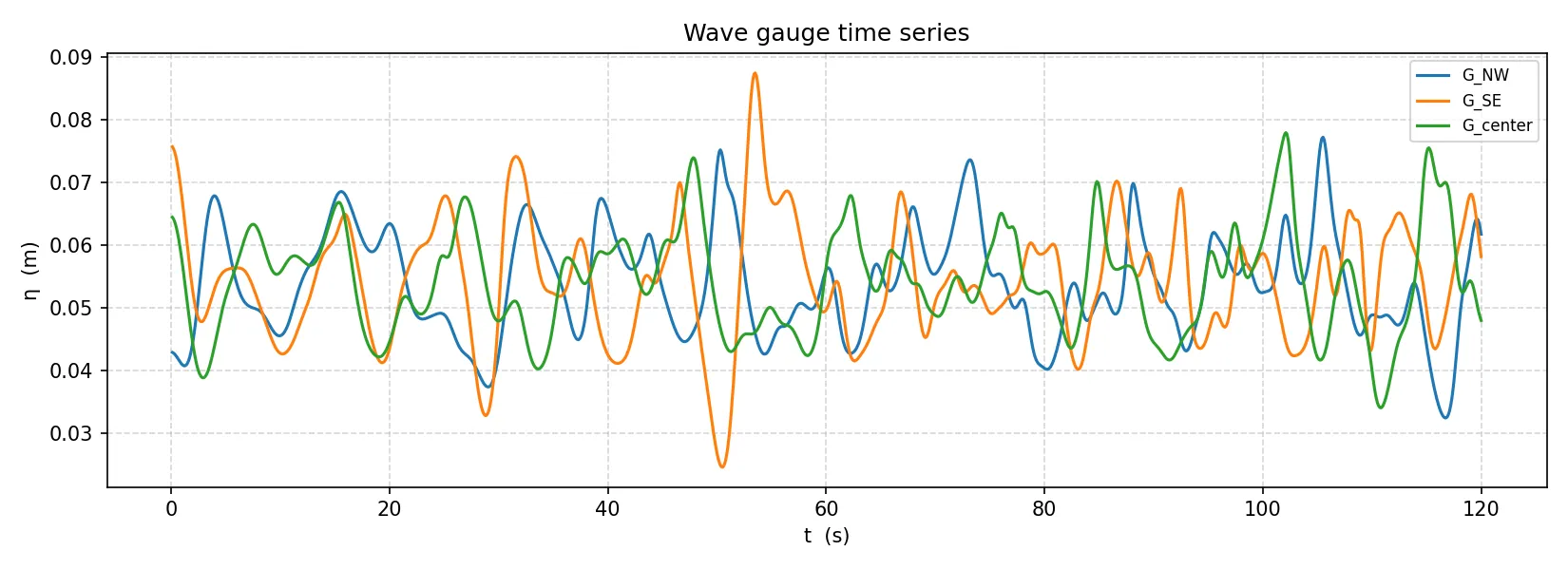
To additionally save a VTK sub-window on the NW quarter, uncomment the field: block in bin/savefield.yaml.
5. Visualize in ParaView
Section titled “5. Visualize in ParaView”Open the time series
Section titled “Open the time series”- Launch ParaView.
- File → Open — navigate to
bin/res/vtk/. - Select
result_000000.vtk. ParaView detects the sequence automatically. - Click Apply in the Properties panel.
Display the free surface
Section titled “Display the free surface”- In the variable dropdown, select
ssh. - Click Rescale to Data Range to fit the color scale.
You should see the 100 m × 100 m domain colored by free-surface elevation, with the random Gaussian bumps visible as shallow regions.
Animate
Section titled “Animate”- Click Play (▶) in the time controls.
Watch the free surface evolve as short gravity waves propagate and scatter across the random bathymetry. The periodic boundary conditions make waves re-enter the domain on the opposite side.
Next steps
Section titled “Next steps”- Tune the geometry — adjust
n_bathy,a_bathy,eps_bathy,h_0directly inbin/input.txtwithout recompiling; or editbin/m_user_data.f90for structural changes (recompiles at eachmrun). - Add friction — set
friction_model = 3andn = 0.03ininput.txtfor Manning friction. - Use MPI —
make MPI=yes extlibonce, thenmake C=gnu PERIO=yes MPI=yes NP=4 mrun. - Reference test cases —
tests/2d_gaussian_forest/is this exact setup;tests/2d_linear_waves/is the linear-wave accuracy benchmark.